Homebrew 完全指南:macOS 包管理从入门到精通
macOS 必备包管理工具 Homebrew 的完全指南,涵盖安装配置、核心概念(Formula/Cask/Tap/Bottle)、国内镜像加速、常用命令、服务管理、自定义 Formula 编写及常见问题排查。
阅读量Homebrew 完全指南:macOS 包管理从入门到精通
如果你使用 macOS 进行开发,Homebrew 是最应该第一个安装的工具。它是 macOS(及 Linux)上最流行的开源包管理器,由 Max Howell 开发——对,就是那个后来被 Google 拒绝面试的传奇人物。
Homebrew 让你告别手动下载 .dmg、拖拽安装、到处找卸载工具的原始方式,用一行命令完成软件的安装、更新和卸载。
一、核心概念
在开始使用之前,理解 Homebrew 的几个核心概念非常重要:
| 概念 | 说明 | 类比 |
|---|---|---|
| Formula | 命令行工具的安装配方(Ruby 脚本),定义了如何下载、编译和安装一个软件包 | apt 中的 package |
| Cask | GUI 应用程序的安装配方(如 Chrome、VS Code),自动下载 .dmg 并安装到 /Applications |
软件管家 |
| Tap | 第三方仓库,可以添加额外的 Formula 或 Cask | apt 的 PPA |
| Bottle | 预编译的二进制包,无需从源码编译,大幅加快安装速度 | 预编译 deb/rpm |
| Cellar | Homebrew 的软件安装目录,所有包安装在 /opt/homebrew/Cellar/(Apple Silicon)或 /usr/local/Cellar/(Intel) |
软件安装根目录 |
Apple Silicon 与 Intel 的路径差异:
| 芯片类型 | Homebrew 安装路径 | Cellar 路径 |
|---|---|---|
| Apple Silicon (M1/M2/M3/M4) | /opt/homebrew |
/opt/homebrew/Cellar |
| Intel | /usr/local |
/usr/local/Cellar |
二、安装 Homebrew
2.1 官方安装(海外网络)
/bin/bash -c "$(curl -fsSL https://raw.githubusercontent.com/Homebrew/install/HEAD/install.sh)"安装完成后,Apple Silicon Mac 需要将 Homebrew 添加到 PATH:
echo 'eval "$(/opt/homebrew/bin/brew shellenv)"' >> ~/.zprofile
eval "$(/opt/homebrew/bin/brew shellenv)"
2.2 国内镜像安装(推荐中国大陆用户)
由于 GitHub 在国内访问不稳定,推荐使用国内镜像脚本安装:
# 中科大镜像(推荐)
/bin/zsh -c "$(curl -fsSL https://gitee.com/cunkai/HomebrewCN/raw/master/Homebrew.sh)"
该脚本会引导你选择镜像源(中科大、清华、阿里云等),并自动完成配置。
2.3 卸载 Homebrew
/bin/bash -c "$(curl -fsSL https://raw.githubusercontent.com/Homebrew/install/HEAD/uninstall.sh)"

# 国内镜像
/bin/zsh -c "$(curl -fsSL https://gitee.com/cunkai/HomebrewCN/raw/master/HomebrewUninstall.sh)"
三、换源加速
如果你使用官方安装但下载速度慢,可以手动切换到国内镜像源。
3.1 中科大源(推荐)
git -C "$(brew --repo)" remote set-url origin https://mirrors.ustc.edu.cn/brew.git
git -C "$(brew --repo homebrew/core)" remote set-url origin https://mirrors.ustc.edu.cn/homebrew-core.git
git -C "$(brew --repo homebrew/cask)" remote set-url origin https://mirrors.ustc.edu.cn/homebrew-cask.git
brew update

# 配置 Bottle 预编译包镜像
echo 'export HOMEBREW_BOTTLE_DOMAIN=https://mirrors.ustc.edu.cn/homebrew-bottles/bottles' >> ~/.zshrc
source ~/.zshrc
3.2 清华源
git -C "$(brew --repo)" remote set-url origin https://mirrors.tuna.tsinghua.edu.cn/git/homebrew/brew.git
git -C "$(brew --repo homebrew/core)" remote set-url origin https://mirrors.tuna.tsinghua.edu.cn/git/homebrew/homebrew-core.git
git -C "$(brew --repo homebrew/cask)" remote set-url origin https://mirrors.tuna.tsinghua.edu.cn/git/homebrew/homebrew-cask.git
brew update

echo 'export HOMEBREW_BOTTLE_DOMAIN=https://mirrors.tuna.tsinghua.edu.cn/homebrew-bottles/bottles' >> ~/.zshrc
source ~/.zshrc
3.3 恢复官方源
git -C "$(brew --repo)" remote set-url origin https://github.com/Homebrew/brew.git
git -C "$(brew --repo homebrew/core)" remote set-url origin https://github.com/Homebrew/homebrew-core.git
git -C "$(brew --repo homebrew/cask)" remote set-url origin https://github.com/Homebrew/homebrew-cask.git
brew update
四、常用命令详解
4.1 包管理基础
| 命令 | 说明 | 示例 |
|---|---|---|
brew search <关键词> |
搜索软件包(支持正则) | brew search node |
brew install <包名> |
安装命令行工具 | brew install node |
brew install --cask <应用名> |
安装 GUI 应用 | brew install --cask visual-studio-code |
brew info <包名> |
查看包的详细信息(版本、依赖、安装路径等) | brew info mysql |
brew list |
列出已安装的所有包 | brew list |
brew list <包名> |
查看某个包安装了哪些文件 | brew list node |
brew outdated |
检查哪些包有新版本可用 | brew outdated |
brew upgrade |
升级所有已过期的包 | brew upgrade |
brew upgrade <包名> |
仅升级指定包 | brew upgrade node |
brew uninstall <包名> |
卸载包 | brew uninstall node |
brew cleanup |
清理旧版本和缓存,释放磁盘空间 | brew cleanup |
brew cleanup -n |
干跑(dry run),只显示会被清理的内容 | brew cleanup -n |
4.2 版本管理
# 锁定某个包的版本,防止 brew upgrade 时意外升级
brew pin <包名>

# 取消锁定
brew unpin <包名>

# 切换到特定版本(如果 Formula 支持)
brew switch <包名> <版本号>   # 旧版命令
brew link <包名>@<版本号>     # 新版方式
4.3 服务管理
Homebrew 可以管理后台服务(如 MySQL、Redis、Nginx),类似 systemd 的简化版:
# 查看所有可管理的服务
brew services list

# 启动服务(仅启动,不注册开机自启)
brew services run <服务名>

# 启动服务并注册开机自启(通过 launchd)
brew services start <服务名>

# 停止服务并取消开机自启
brew services stop <服务名>

# 重启服务
brew services restart <服务名>

# 以 root 权限运行(如绑定 80 端口的 Nginx)
brew services run --sudo <服务名>背后的原理:brew services start 实际上是在 ~/Library/LaunchAgents/ 下创建了一个 plist 文件,由 macOS 的 launchd 管理。
五、Tap:扩展软件源
5.1 添加第三方 Tap
当官方仓库中没有你需要的软件时,可以添加第三方 Tap:
# 添加 Tap
brew tap <user/repo>

# 常见第三方 Tap 示例
brew tap homebrew/cask-versions    # 提供软件的多个版本(如 java11, java17)
brew tap homebrew/cask-fonts       # 字体安装(已合并到主 cask)

# 查看已添加的 Tap
brew tap
5.2 从 Tap 安装
brew install <tap-name>/<formula>
# 例如
brew install homebrew/cask-versions/java17
六、辅助工具
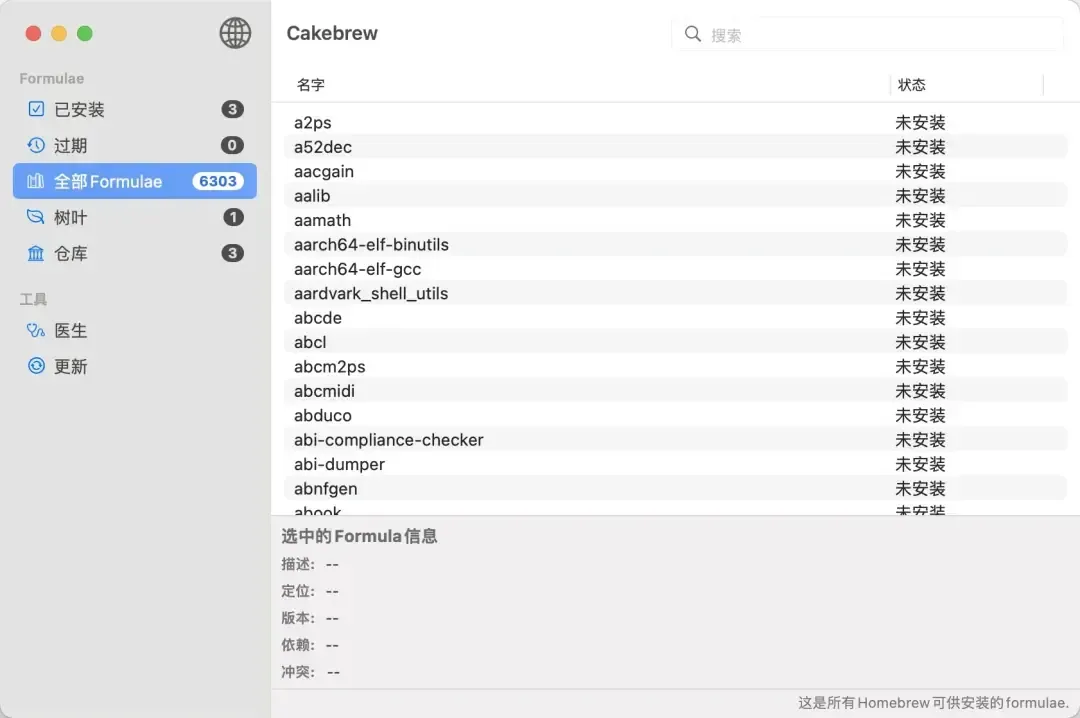
6.1 Cakebrew —— Homebrew 的 GUI 管理工具
如果你更喜欢图形界面,Cakebrew 提供了可视化的包管理体验:
brew install --cask cakebrew功能包括:浏览已安装包、搜索新包、一键升级、查看依赖关系图。
6.2 brew bundle —— 批量管理
brew bundle 可以通过一个 Brewfile 声明式管理所有需要安装的软件,适合在新 Mac 上快速还原开发环境:
# 导出当前已安装的包到 Brewfile
brew bundle dump

# 根据 Brewfile 批量安装
brew bundle install
Brewfile 示例:
# Taps
tap "homebrew/cask"
tap "homebrew/services"

# 命令行工具
brew "node"
brew "mysql"
brew "redis"
brew "git"
brew "wget"

# GUI 应用
cask "visual-studio-code"
cask "google-chrome"
cask "iterm2"
cask "docker"
七、常见问题排查
7.1 brew doctor —— 第一诊断工具
遇到任何 Homebrew 问题,先运行:
brew doctor它会检测常见问题并给出修复建议,如:未链接的包、过期的依赖、权限问题、PATH 配置错误等。
7.2 安装失败:权限问题
# 修复 Homebrew 目录权限
sudo chown -R $(whoami) /opt/homebrew   # Apple Silicon
sudo chown -R $(whoami) /usr/local      # Intel

# 修复特定目录
sudo chmod -R 755 /opt/homebrew/Cellar
7.3 安装失败:Xcode Command Line Tools
Homebrew 依赖 Xcode Command Line Tools 进行编译。如果缺失:
xcode-select --install7.4 包冲突或链接错误
# 强制链接
brew link --overwrite <包名>

# 取消链接
brew unlink <包名>

# 重新链接
brew link <包名>
7.5 磁盘空间不足
# 查看 Homebrew 占用的磁盘空间
brew cleanup -n  # 预览
brew cleanup     # 执行清理

# 彻底清理(包括缓存)
brew cleanup --prune=all
7.6 完全重置 Homebrew
如果问题无法解决,可以完全卸载后重新安装:
/bin/bash -c "$(curl -fsSL https://raw.githubusercontent.com/Homebrew/install/HEAD/uninstall.sh)"
# 然后重新安装
八、实用技巧
8.1 查看包的依赖树
brew deps --tree <包名>8.2 只下载不安装
# 下载 Bottle 到缓存目录
brew fetch <包名>
8.3 从源码编译
# 强制从源码编译安装(不使用预编译 Bottle)
brew install --build-from-source <包名>
8.4 编辑 Formula
# 编辑 Formula 文件(如修改编译参数)
brew edit <包名>
相关链接
- Homebrew 官网:https://brew.sh/
- 可用包搜索:https://formulae.brew.sh/
- GitHub 仓库:https://github.com/Homebrew/brew
- 官方文档:https://docs.brew.sh/